Welcome to Micrograd – a mini-autograd engine built in C#! Inspired by the goat himself Andrej Karpathy's implementation of micrograd, this project is lit because it lets you train your own neural nets from scratch and perform on tasks like binary classification. And why C#, you ask? Because I'm dumb AF—just use Python if you want to avoid the hassle—but C# helps me build my intuition better.
- Autograd Engine:
Built from scratch to automatically compute gradients so you can backprop like a boss. - Neural Network Components:
Rockin' neurons and layers (peep Neuron.cs and MLP.cs for the deets). - Training Vibes:
Loads up the moons dataset (moons_dataset.csv) and spits out training logs, loss curves, and decision boundaries. Check out program.cs for the main action.
- Value Class:
This is the heart of our autograd engine. It handles:- Arithmetic Operations: Overloads operators for addition, subtraction, multiplication, and division.
- Activation Functions: Implements functions like Tanh, Exp, Pow, Log, and ReLU.
- Backpropagation: Uses reverse-mode automatic differentiation to compute gradients. Each
Valuerecords its operation history, so when you call.backward(), it uses the chain rule to propagate gradients back through the computational graph. This is essentially a minimal version of what you’d see in frameworks like PyTorch, but with all the gritty details spelled out in C#.
- Neuron:
Each neuron:- Initializes with random weights and a bias.
- Computes a weighted sum of inputs.
- Applies a non-linear activation function to introduce non-linearity into the model.
- Layer:
A layer is simply a collection of neurons. It abstracts the process of:- Forward propagation (aggregating neuron outputs).
- Passing the outputs to the next layer.
- MLP (Multi-Layer Perceptron):
An MLP is a stack of layers that forms a deep neural network for binary classification. It handles:- Forward Propagation: Passing inputs through each layer to produce an output.
- Loss Calculation: Likely using functions such as Mean Squared Error or Cross-Entropy.
- Backward Propagation: Utilizing the autograd engine to compute gradients and update parameters.
-
Data Loading:
TheLoadMoonsDatamethod (inprogram.cs) reads a CSV file containing the moons dataset. It expects three columns:- x1: First input feature.
- x2: Second input feature.
- label: Class label (assumed to be -1.0 or 1.0, then converted to an integer).
-
Training Execution:
The main training loop inprogram.csdoes the following:- Forward Pass: Computes the network's output.
- Loss Computation: Measures the error between predictions and actual labels.
- Backward Pass: Triggers backpropagation via the autograd engine.
- Parameter Update: Applies gradient descent (or a variant thereof) to adjust the weights.
Training logs are saved to
training_logs.csv, and decision boundary information is output todecision_boundary.csv.
-
Jupyter Notebooks:
Two notebooks are provided for interactive exploration:Binary Classification using Micrograd (lower noise).ipynbBinary Classification using Micrograd (higher noise).ipynb
These notebooks let you tweak parameters and visually inspect:
- Loss Curves: See how the loss decreases over epochs.
- Decision Boundaries: Watch the boundary evolve as the network learns.
The notebooks use libraries like Matplotlib for plotting, giving you a front-row seat to the training dynamics.
-
Hyperlinks for the Nerds:
- Project File – where the magic is set up.
- Autograd Scalar – brush up on high school calculus before clicking.
- Module Base – keeps things modular with parameter zeroing and more.
- Neuron Details – the building blocks of our neural nets.
- MLP Layers – the guts of our network architecture.
- Main Runner – where it all kicks off.
-
Dope Visuals:
- Multi Layer Perceptron
- Neuron
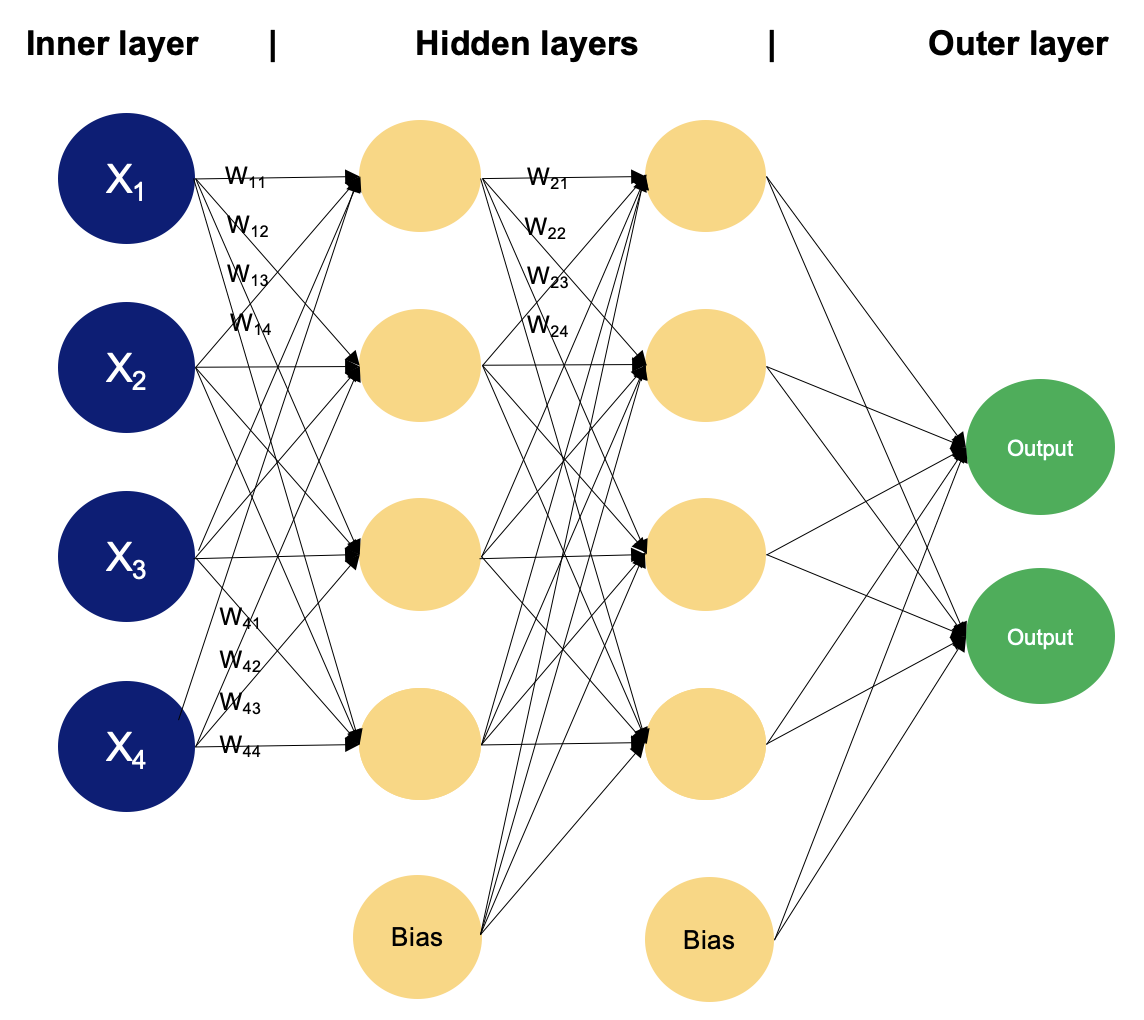
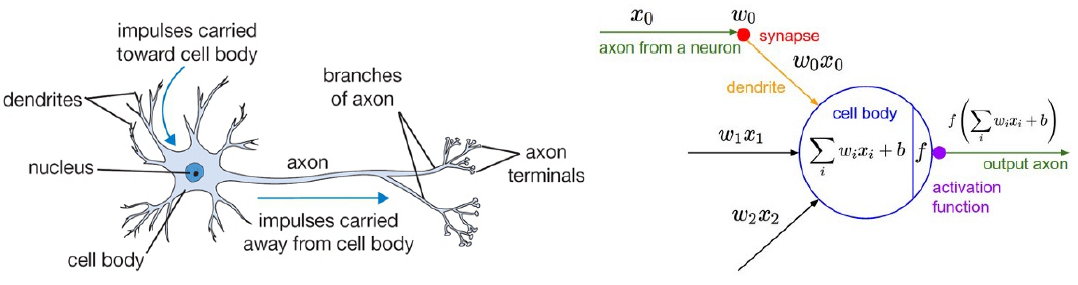
You’ll see a diagram referencing a CNN above—so what is a Convolutional Neural Network (CNN), and how is it different from the MLP approach used in this repo?
Convolution Layers:
Instead of feeding raw input directly to fully connected layers (like in an MLP), CNNs use filters (also called kernels) that slide over the input data (often images) to detect local features. For instance, a small 3×3 filter could learn to detect edges or corners. These filters are learned automatically during training, just like MLP weights.
Final Classification Layers:
After the convolutional part does its magic, the feature map is flattened and sent into a small MLP-like network for the final classification. Think of it as a specialized featurizer + standard classification head.
While Micrograd here focuses on MLPs for simplicity, the same principles of autograd and backpropagation apply to CNNs—just with more sophisticated layers and operations. If you’re feeling spicy, you could extend this framework to add convolution layers, but fair warning: get ready for some matrix indexing madness!
-
**Some Pretty Nice Curves we got from our lil experiment :)
-
Decision Boundary from Our Binary Classification Experiment:

Note: Data points = 1000, noise = 0.1. Blood, sweat, and tears were split.


- Clone the Repo:
Clone the repository and open it in VS Code. - Run the Project:
Open your terminal and execute:dotnet run